2026
Cisco Policy Copilot
How Policy Copilot cut firewall policy generation time by 40%
Designs are recreated from memory; original files are under Cisco IP.
- Role
- Sr. Product Designer
- UX Strategy
- AI Interaction Design
- Product Design
- Visual Design
- Prototyping
- Client
- Cisco
- Timeline
- 12 weeks
- Info
- Policy Copilot explores AI-assisted firewall policy inside Cisco Hybrid Mesh Firewall. Administrators describe outcomes in natural language; Copilot reflects understanding, maps inventory objects, runs visible validation, and keeps every draft separate from production until a human approves.
Every firewall policy starts with a conversation.
Interactive demo — explore the workspace
Every Firewall Policy Starts the Same Way.
- Not with a firewall rule.
- Not with a protocol.
- Not with a configuration screen.
It starts with someone saying,
“Can doctors securely access patient records from hospital-managed devices?”
It sounds like a simple request, but behind that sentence are dozens of security decisions. Who should have access? Which application is involved? Should remote access be allowed? Does it meet compliance requirements? Could one mistake expose the network? The request takes seconds to describe, but making the right decision can take hours.
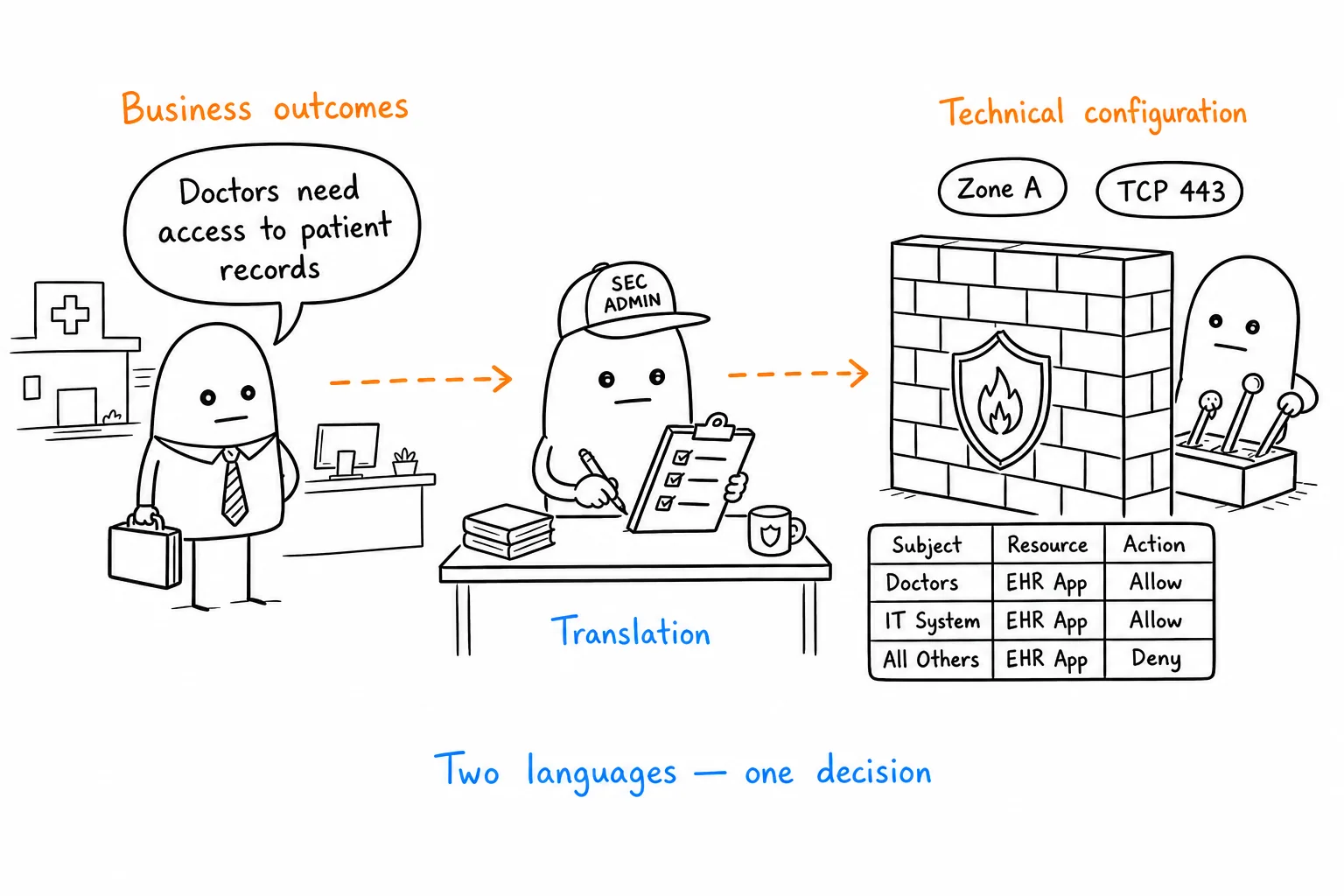
Business outcomes
Stakeholders speak in plain language
Translation
Administrator bridges both sides
Firewall expects
Identities, zones, protocols, policies
When I joined the project, I thought we were redesigning firewall policy creation. After spending time with security engineers, I realised the real challenge came much earlier. We weren’t redesigning firewall policies—we were redesigning how administrators understand a business request before it becomes one.
The Real Work Happens Before the Firewall
Research insight
One thing surprised me during research. Administrators rarely started inside the firewall. Their work usually began somewhere else—long before anyone opened a policy editor.
Where business requests first appeared
- Slack messages
- Jira tickets
- Emails
- Teams calls
- Conversations with other teams
The work products never saw
Before they even opened the policy editor, they had already:
- Gathered business context
- Reviewed documentation
- Checked existing policies
- Validated compliance requirements
- Coordinated with multiple stakeholders
The hardest part of the job
Where products start
Source
Destination
Application
Protocol
Action
Assumes steps 1 and 2 are already complete
By the time they reached the firewall, most of the thinking had already happened. The policy editor simply assumed all of that work was complete—even though it was the hardest part of the job.
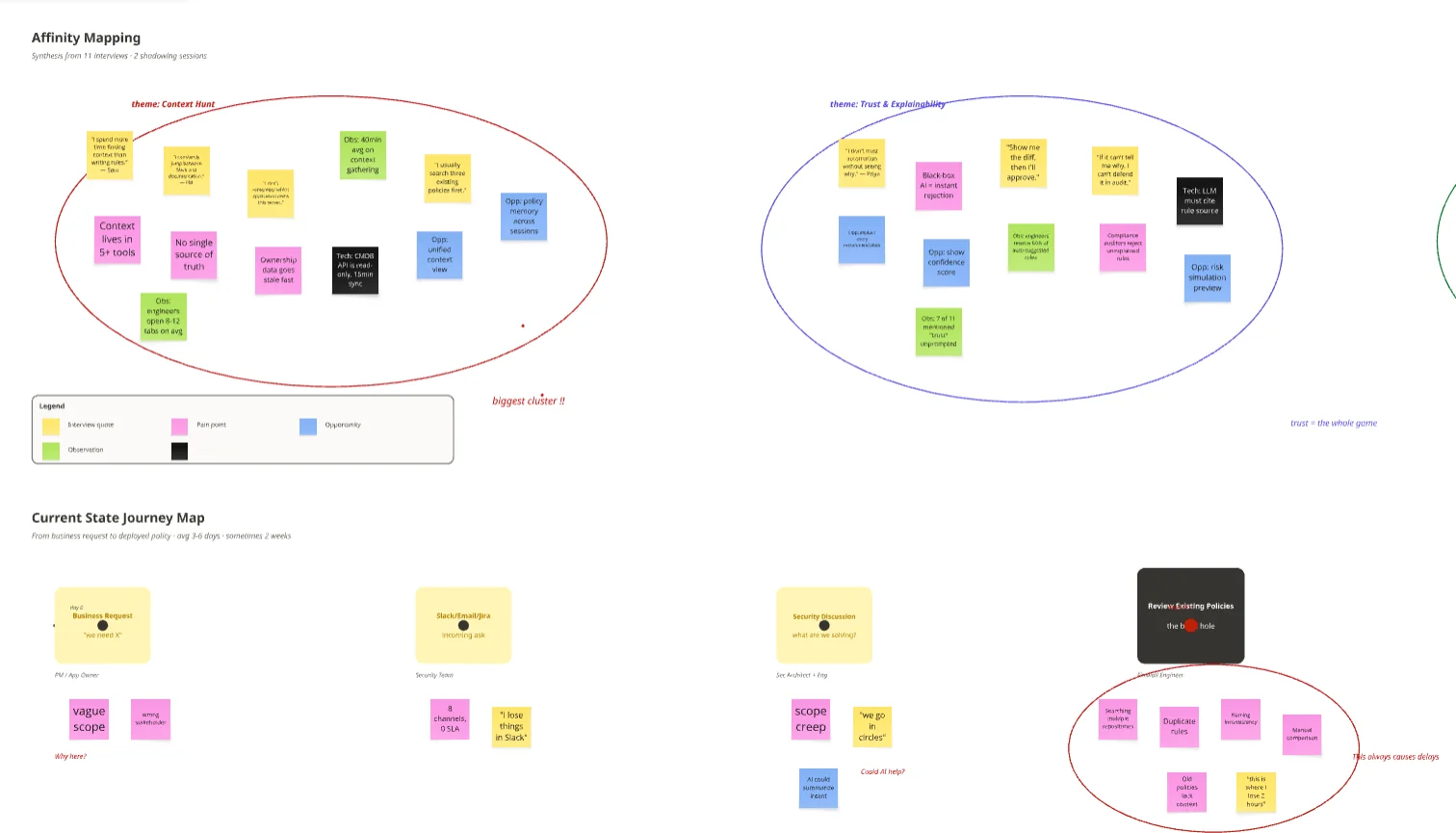
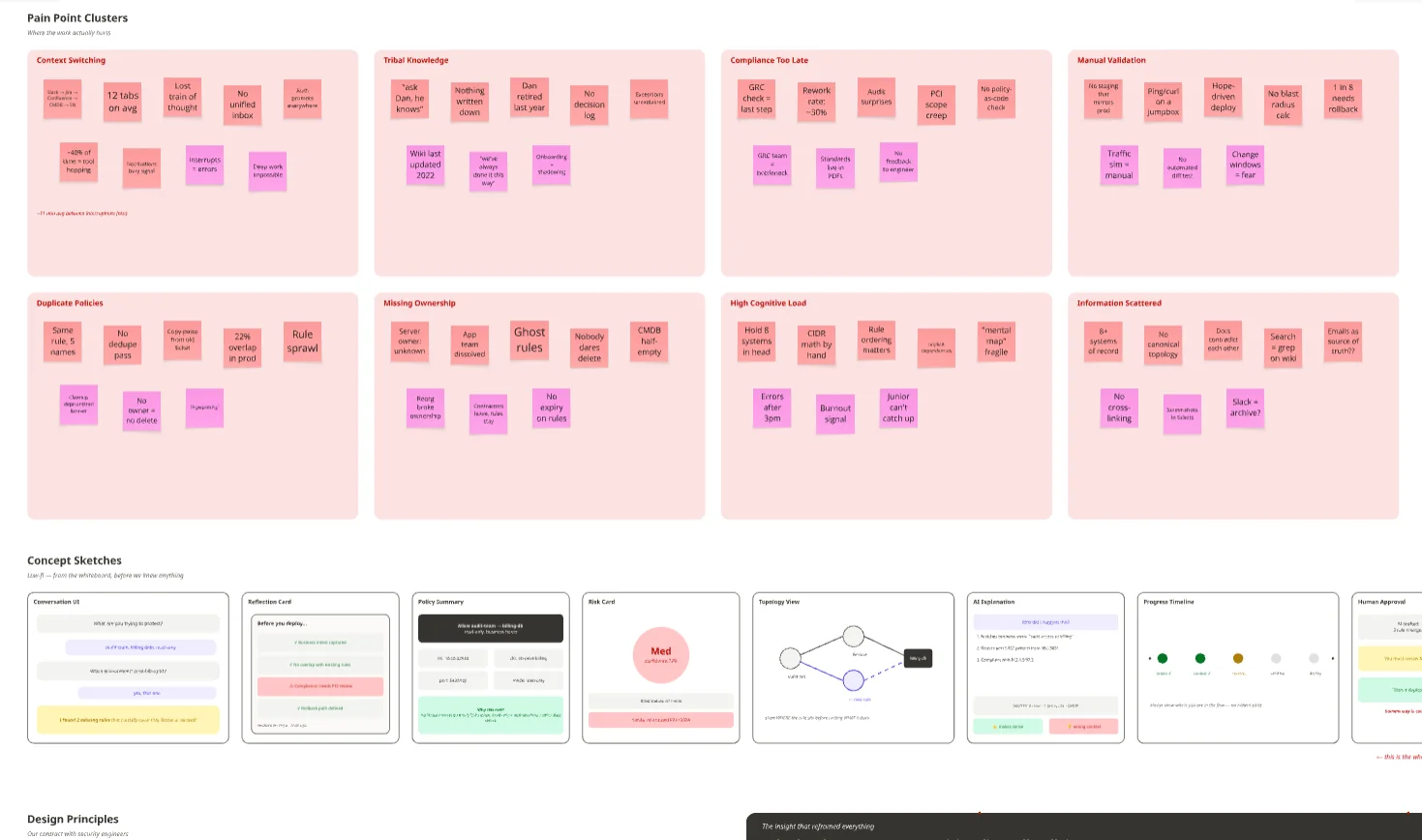
One security engineer said something I’ll probably remember for the rest of my career.
“Writing the policy isn’t the hard part. Understanding what people actually mean is.”
That sentence changed how I looked at the product.
We Were Solving the Wrong Problem
After several research sessions, our workshop wall was covered with sticky notes. We had captured everything we heard:
- Applications
- Identity
- Compliance
- Existing Policies
- Risk
- Business Language
- Trust
Individually, they felt like disconnected observations. Together, they revealed something much bigger.
Administrators weren’t struggling to create firewall policies. They were translating business conversations into technical decisions.
Reframe
That insight completely reframed the problem. Instead of focusing on faster policy generation, we focused on better decision-making.
We stopped asking
“How can AI generate firewall policies faster?”
Speed-first framing
We started asking
“How can AI help administrators understand a request before creating one?”
Understanding-first framing
That shift became the foundation for everything we designed next.
A Familiar Problem, Different Industry
I often explain this challenge using Google Maps.
Imagine typing,
“Take me to the airport.”
Instead of showing directions, Maps asks for GPS coordinates, routing algorithms, and road classifications.
Everything is technically correct. Nothing helps you reach the airport. Traditional firewall products often worked the same way. They asked administrators to think about firewall objects before helping them think about the business problem.
People don’t think in ports, protocols, or policies. They think in outcomes.
Policy Copilot simply flipped that order.
Start with intent. Let configuration follow.
Four Principles Shaped Everything
Once we understood the real problem, the design principles became surprisingly clear.
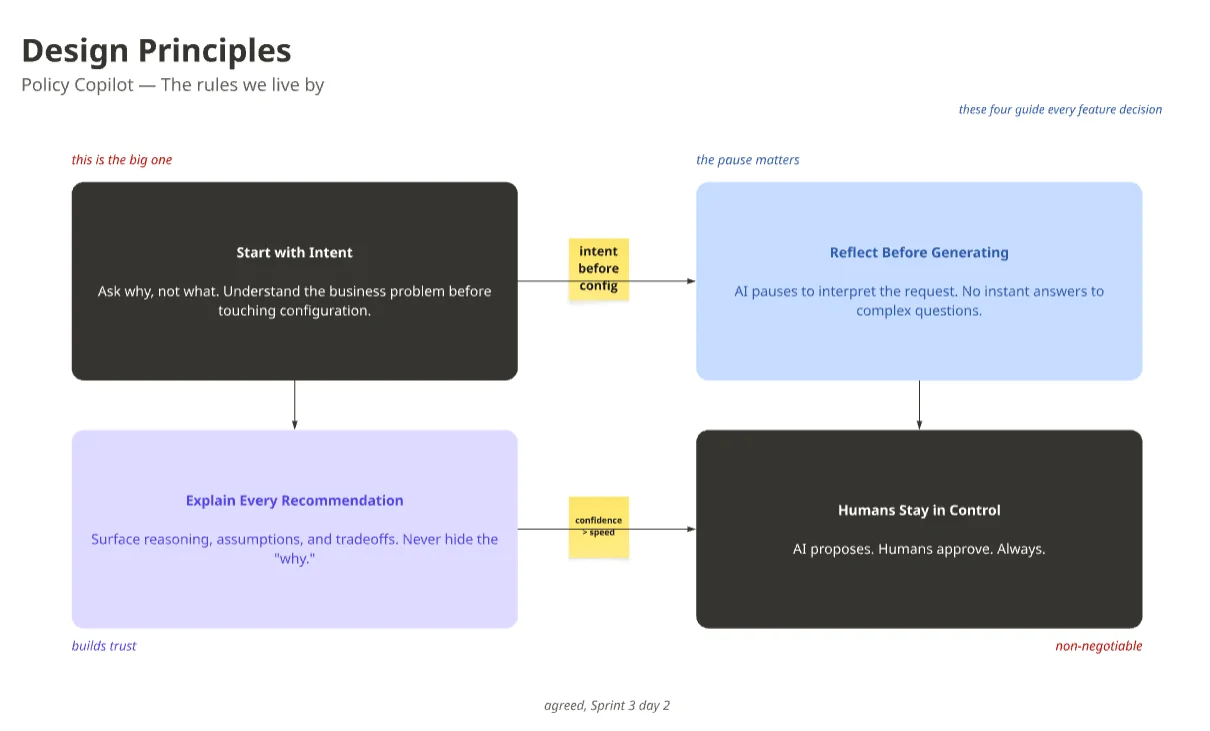
By the end of discovery, we weren’t designing a tool that generated firewall policies. We were designing one that helped people make better security decisions. Everything that followed—from the interaction model to the final workflow—was built around that idea.
Designing Understanding Before Automation
The goal wasn’t to generate a firewall policy. It was to help administrators understand what they were about to approve.
By the end of research, we realised every policy started as a business request but ended as technical configuration. Somewhere between those two worlds sat the administrator, translating outcomes into secure decisions.
Policy Copilot wasn’t designed to replace that expertise. It was designed to make the journey from business intent to trusted policy faster, clearer, and easier to understand.
Configuration vs Conversation
Technical fields on the left. Business intent becoming structured understanding on the right.
Configuration
Start with technical fields
Source
Destination
Application
Protocol
Zone
Action
High cognitive load before meaning is clear
Conversation
Start with business intent
“Allow doctors to securely access patient records from hospital-managed devices.”
Structured understanding
Request
Doctors need secure EHR access
Users
Doctors-AD-Group
Application
EHR-Application-Object
Meaning first — policy comes later
Start With Intent, Not Configuration
Traditional firewall products usually begin with configuration.
- Source
- Destination
- Application
- Protocol
- Ports
- Logging
Every field assumes the administrator already knows the technical answer.
Policy Copilot starts with a different question:
“What are you trying to achieve?”
Administrators no longer had to translate a business request before opening the product. They could simply describe the outcome. The product handled the translation. People stayed focused on the problem. The firewall received the configuration it needed.
Understanding Before Generation
Like many AI products, our first prototype generated a policy immediately. It worked—but it answered before proving it had understood the request.
So we slowed the experience down. Before generating anything, Policy Copilot reflected its understanding back to the administrator.
The First Draft Wasn’t the Policy
During usability testing, one pattern appeared again and again. Administrators rarely edited the generated policy first.
They corrected the AI’s interpretation instead:
- User groups
- Applications
- Remote access
- Missing context
That changed our thinking.
People preferred reviewing meaning before configuration. So we changed what “first draft” meant. The interpretation became the first draft. The firewall policy became the second.
One Workspace, Not Five Screens
Most enterprise products move people through a series of screens. We wanted the opposite. One workspace where the conversation, the context, and the policy stayed together.
As administrators confirmed details, the workspace gradually expanded:
- Users
- Applications
- Network zones
- Access conditions
- Compliance
Every new card was connected to the original request. Nothing appeared out of nowhere.
The policy wasn’t generated in a single step. It was assembled one decision at a time.
Make AI Thinking Visible
One design principle guided almost every interaction. Never make administrators wonder what changed.
Whenever the AI updated the workspace, it clearly explained:
- What changed
- Why it changed
- How confident it was
- What still needed confirmation
Nothing appeared without context. Nothing felt like a black box.
The goal wasn’t to make administrators trust the AI. It was to make its thinking easy to understand.
Component Exploration
Transparent AI
Patterns that made thinking visible in the workspace.
Shipped patterns
Every update explained what changed, why, and how sure the model was.
Editable AI chips
Users
Doctors-AD-Group
Application
EHR-Application-Object
Confidence indicator
Mapping complete
Confirm understanding before safety checks run.
Assumption cards
- MFA recommended for clinical paths
- Everyone not named is denied by default
Explanation tooltip
Inline suggestions
Reasoning panel
Doctors need EHR from managed devices only — nurses blocked unless you add a break-glass path.
Source · intent + Doctors-AD-Group inventory
Policy preview cards
Allow · doctors → EHR
Hospital-managed devices only
Deny · nurses → EHR
Clinical role separation
One Moment Changed Everything
During one internal review, an engineer looked at the prototype for a few seconds and said,
“This doesn’t feel like writing firewall rules anymore.”
He paused. Then smiled.
“It feels like reviewing someone else’s work.”
That was exactly the experience we were trying to create. The AI wasn’t the author. It was the first reviewer. The administrator remained the final one.
Designing Trust
The hardest question wasn’t “Can AI generate a policy?” It was “Should I trust it?”
Once Policy Copilot could understand a request and draft a policy, the challenge shifted. In enterprise security, a policy is only valuable if someone is confident enough to approve it.
One security architect captured it perfectly:
“I don’t mind if AI writes the first draft. I mind if I can’t explain why I’m approving it.”
That insight shaped the rest of the product. Trust wasn’t something we added at the end—it had to be designed into every interaction.
Validation Became Part of the Conversation
Our first idea was straightforward: Generate → Validate → Fix → Deploy.
It looked logical, but it didn’t reflect how administrators actually worked. Research showed that experienced administrators validated continuously. Every decision raised another question:
- Does a similar rule already exist?
- Could this affect another application?
- Does it meet company standards?
Validation wasn’t a final step. It was part of the decision-making process. So instead of adding another validation screen, we embedded validation into the workspace. As administrators confirmed users, applications, and access conditions, Policy Copilot quietly checked:
- Existing policies
- Compliance requirements
- Security standards
- Duplicate rules
- Network segmentation
- Potential impact
Nothing interrupted the workflow. The product surfaced issues only when they mattered.
Continuous validation
Checks refresh as you confirm users, applications, and access conditions — no separate validation screen.
Informed
0 / 6
Users
Doctors · Doctors-AD-Group
Application
Electronic Health Records
Devices
Managed hospital endpoints
Nothing blocks the workflow — issues surface only when they matter.
Explain the Recommendation, Not Just the Result
Usability testing revealed another important insight.
Administrators rarely asked, “What should I do?”
They asked, “Why are you recommending this?”
That changed how we designed recommendations. Instead of simple alerts, every suggestion included the reasoning behind it.
For example, if Policy Copilot recommended enabling audit logging, it explained why:
- The application handled sensitive healthcare records.
- Similar policies already enabled logging.
- Organisational standards required an audit trail.
Instead of asking administrators to trust the recommendation, we gave them the context to make their own decision.
Recommendations
Suggested improvements with supporting evidence and expected impact — compare, apply, or dismiss each one.
Suggested change
Enable audit logging on the EHR allow path
Supporting evidence
- Application handles sensitive healthcare records (ePHI).
- 3 similar clinical policies already enable logging.
- Organisational standards require an audit trail.
Business impact
Faster compliance reviews without slowing clinician access.
Security impact
Forensic trail on allow and deny paths if access patterns drift.
Audit logging on the allow path gives security teams a defensible record without changing who can access EHR — the gap is visibility, not access.
Explain the recommendation, not just the result.
Let the AI Admit Uncertainty
Another design decision was surprisingly simple. If the AI wasn’t sure, it said so.
Instead of making assumptions, it asked for clarification:
- Should remote access be allowed?
- Should contractors inherit these permissions?
- Should access expire automatically?
Rather than reducing trust, those moments increased it. In enterprise security, admitting uncertainty is often safer than pretending certainty.
Confidence Growth
Confidence rises as ambiguity falls — each step adds evidence before anyone approves deployment.
Help People Review Impact, Not Configuration
Before approving a policy, administrators wanted one answer:
“What happens if I deploy this?”
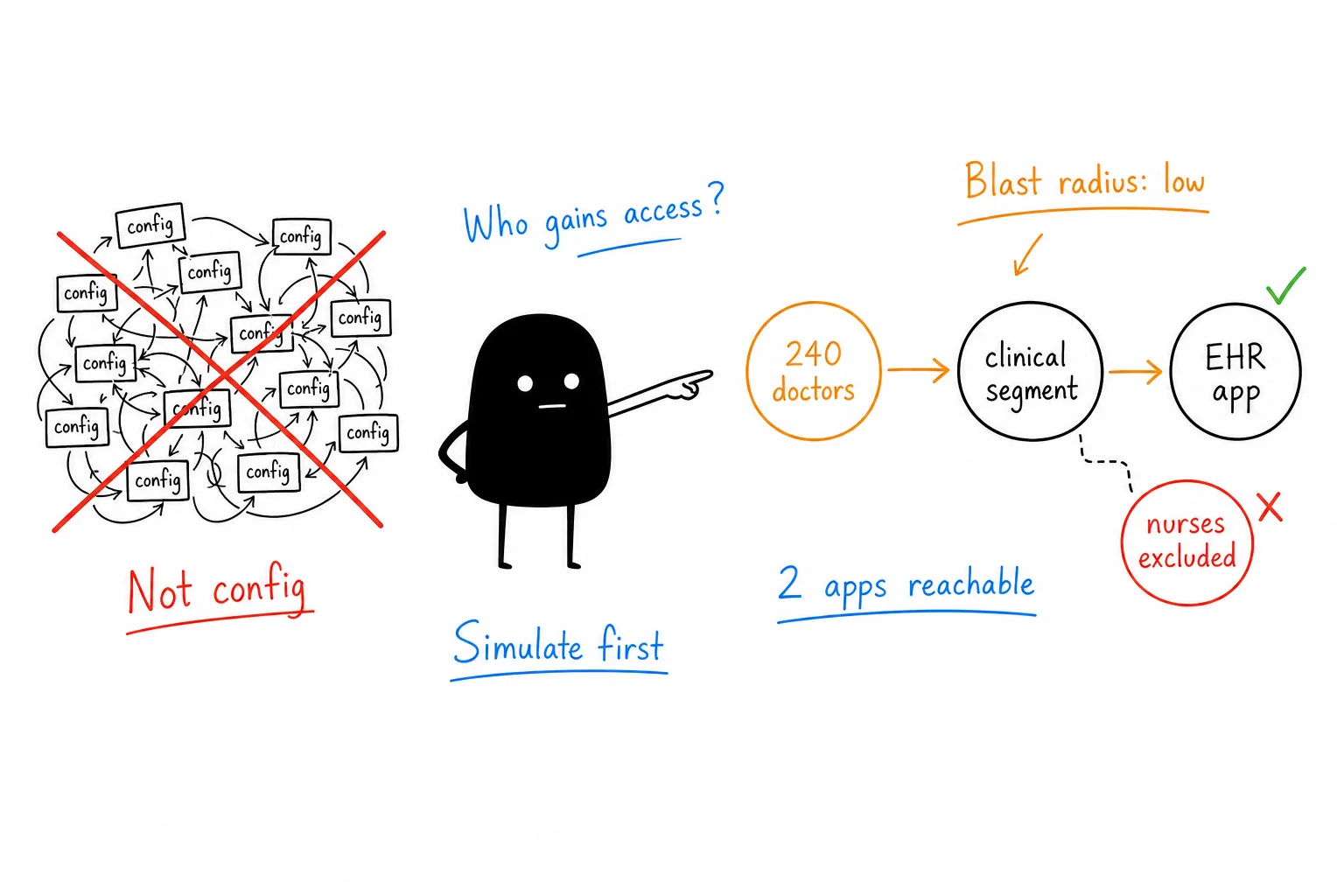
Instead of asking them to interpret firewall rules, Policy Copilot simulated the outcome:
- Who gains access
- Which applications become reachable
- How traffic paths change
- The potential impact
Administrators stopped reviewing configuration.
They started reviewing impact.
Human Approval Was Never Optional
One principle never changed.
No matter how confident the AI became, it could never deploy a policy. It could:
- Understand intent
- Interpret requests
- Recommend actions
- Validate decisions
- Simulate impact
- Optimise policies
The final approval always belonged to the administrator.
That wasn’t a technical limitation—it was a product principle. Enterprise security depends on accountability, so AI supports judgement, but people make the final decision.
Business intent
Secure EHR access for doctors on hospital-managed devices
AI interpretation
Doctors-AD-Group → EHR-Application · HTTPS 443 · session logging on allow path
Validation results
6 checks passed — compliance, duplicates, segmentation, and impact clear
Simulation insights
240 doctors in scope · 2 applications reachable · low impact
Optimisation opportunities
Enable audit logging — aligns with 3 similar clinical policies
Remaining risks
No blocking issues — nurses and contractors remain excluded
Approval readiness
Draft policy · clinical access request
Ready to approve
Checks passed · impact reviewed · human decision required
Human approval required
Policy Copilot prepared the draft. You own the decision to deploy to production.
The Real Product Was Confidence
Looking back, I don’t think the product we designed was a validation engine.
It was confidence.
Every interaction—from clarifying intent to explaining recommendations and simulating impact—helped administrators answer one simple question:
“Do I understand this well enough to move forward?”
Once they did, approving the policy became the easiest decision in the workflow.
One Workspace. One Conversation.
The most successful part of the experience wasn’t any individual screen.
It was the continuity.
The original request stayed visible, every decision built on the last, and the entire workflow happened in one shared workspace.
By the time the policy was approved, it no longer felt AI-generated. It felt like a decision the administrator had made—with AI helping along the way.
What Changed — and Where I’d Take It Next
This project changed how I think about AI.
Started
AI should automate work
Finished
AI helps people make better decisions
What Changed
Policy Copilot shifted firewall policy creation from configuration-first to intent-first, turning AI into a decision-making partner instead of a rule generator.
Key Outcomes
Reusable interaction model built around:
- Intent-first policy creation
- Continuous validation
- Explainable AI
- Human approval
- Shared understanding
The biggest outcome wasn’t faster policy creation—it was greater confidence in every decision.
If I Continued
Evolve Policy Copilot into an organisational knowledge system:
- Understand why policies exist
- Reuse previous decisions
- Detect duplicate or unused rules
- Recommend improvements proactively
Support not just policy creation, but long-term organisational learning.